 TradePack
How Fomo's Trader Leaderboard and Copy-Trading Actually Work
Last updated: September 6, 2026 · Reviewed by the TradePack Research Team
Fomo bills itself as a social trading app — not just a place to swap tokens, but a place to watch what other traders are doing in real time, and decide whether to follow them. Here’s exactly how that works, based on our own walkthrough of the live app.
The Leaderboard
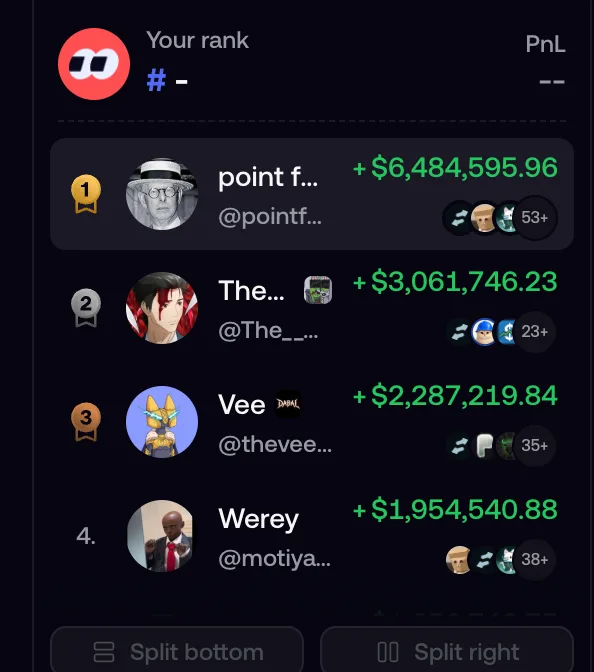
Fomo’s leaderboard ranks traders by realized PnL (profit and loss), with filters for 24H, 7D, 30D, and all-time. Each entry shows the trader’s handle, total PnL in dollars, and small icons indicating shared token positions with other top traders. There’s also a “Clans” section — groups of traders ranked by combined PnL — and your own rank shows up at the top even if you haven’t traded yet.
Trader Profiles: More Than Just a Rank
Tap into any trader’s profile and you get a full picture: follower/following counts, average hold time, total trade count, join date, and a short bio. Below that, their top individual trades are shown as cards (token, dollar gain, percentage gain), followed by a PnL chart you can toggle between 24H/7D/30D, and a complete swap history — every buy and sell, with the token and dollar amount.
Traders can also post short “Thesis” notes explaining why they bought something — these show up directly on their profile and on the token pages where they hold a position.
Per-Token View: Who’s Holding, and at What Price
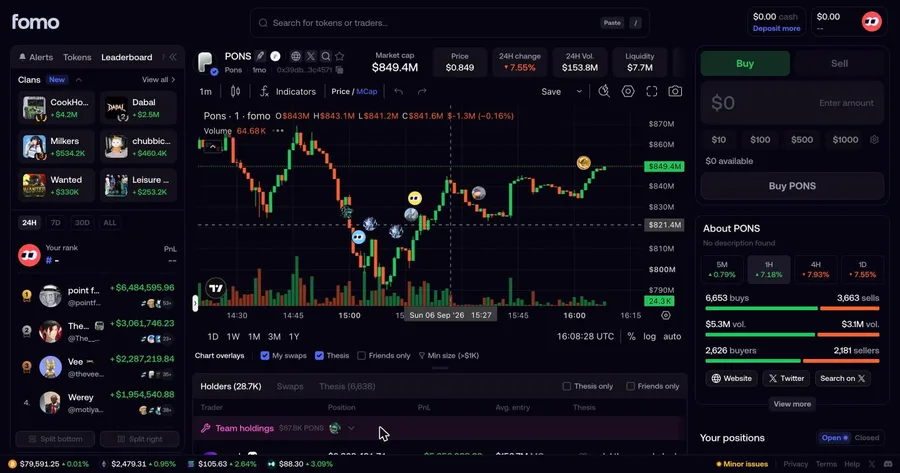
This is the part that’s easy to miss. Open any individual token’s page and there’s a Holders/Swaps table showing every trader with a position — their position size, PnL, and average entry price (shown as the market cap at the time they bought in). Check “Friends only” and the list narrows to just the traders you follow.
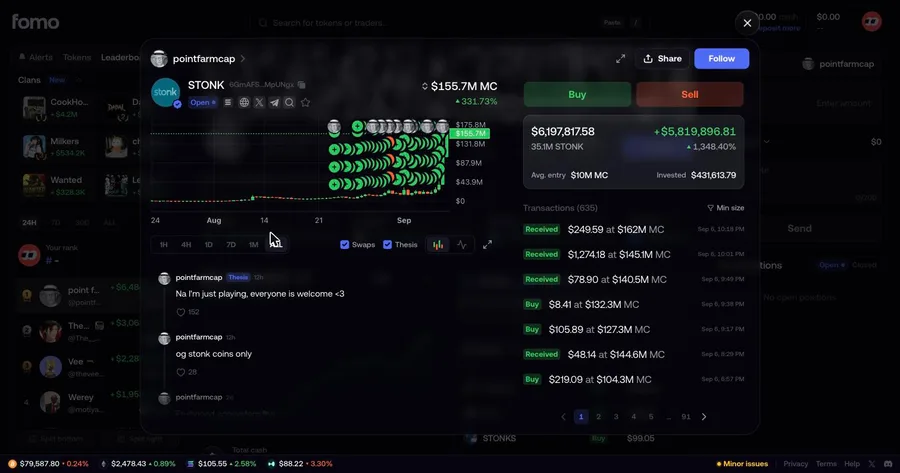
Go one step further and tap into a specific trader’s position on a specific token, and you get a dedicated view: their exact entry point plotted on the price chart, a full transaction log (each buy/sell with the market cap at that moment and a timestamp), and any “Thesis” commentary they posted about that specific trade.
What This Is Useful For — and What It Isn’t
Seeing a trader’s real, verifiable track record before deciding whether to pay attention to their calls is genuinely useful — it’s a lot more transparent than an anonymous tip in a Telegram group. But a few things are worth keeping in mind:
- The leaderboard only shows winners. By definition, you’re looking at the top performers over a given window — not the much larger number of traders who lost money over the same period. That’s survivorship bias, and it’s easy to forget when a leaderboard is the first thing you see.
- Past performance isn’t a guarantee of anything. A trader who was up 1,000% last month can be down just as fast the next. Copying a position after the fact means buying in at a different price than they did.
- Meme coins are extremely volatile. Most of what shows up on Fomo’s leaderboard and token pages is meme coin trading — a category where large, fast price swings (in both directions) are the norm, not the exception. This is not financial advice, and nothing in this article should be read as a recommendation to buy, sell, or copy any specific trade.
If you want to try it yourself, TradePack’s referral code gets you a 10% discount on Fomo’s trading fees — see our referral code guide for details.
Risk disclosure
This site is an independent, unofficial review resource. We are not affiliated with, endorsed by, or acting on behalf of Fomo. We earn a commission if you sign up and trade using our referral link. Cryptocurrency trading involves substantial risk of loss and is not suitable for everyone. Nothing on this site is financial advice. Please do your own research.